
How sharing works
Sharing is available when your account has more than one user. You share a saved file with one other user in the same account, or with all users in the account. The person you share with is the recipient.
Each file can have one named recipient, and you can choose a different recipient for each file.
Share a file
- Open the file you want to share.
- Click Save As.
- Under "Share with:", enter the recipient's user name, the name they use to log in to Alta Star Forms Online. Or tick Share with all users.
- Tick Allow other users to edit if the recipient may change the file. Leave it clear for read-only sharing.
- Keep the existing file name or enter a new one, then click Save.
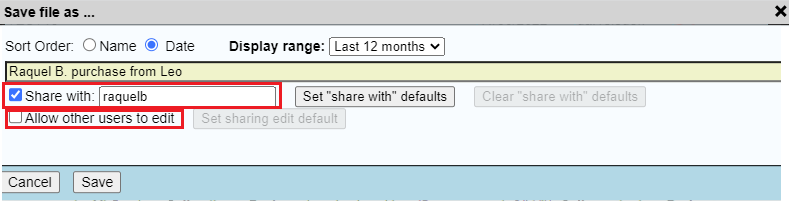
The file is saved and shared at the same time.
Set sharing defaults
In the Save As window, click Set "share with" defaults to make the current recipient the default for future saves, and Set sharing edit default to remember the edit setting. Clear "share with" defaults removes the saved recipient.
Stop sharing a file
- Open the file.
- Click Save As.
- Clear the "Share with:" name and the Share with all users box.
- Click the existing file name, then Save. Click OK when asked to replace the file.
Saving over the file without a recipient ends the sharing.
Open a file shared with you
When sharing is active, the Open window has two tabs:
- The first tab lists your own files, and shows the recipient of each file you have shared.
- Shared by Others lists files other users have shared with you, and shows who created each one.
Editing a shared file
You save a shared file with Save as usual. If the other person saves changes while you have the file open, your copy is out of date and Save is refused. Either reopen the file to pick up their changes, or use Save As with a different name.