
When you add a signer to a session you can require the signer to pass a check before signing. You choose per signer.
The three options
SMS text. A code is sent to the signer's mobile phone. The signer enters it before signing. No extra charge.
PIN. You set a PIN of at least four digits for this signer, never used before and never reused, and give it to the signer yourself. The signer enters it before signing. No extra charge. Use one PIN per signer rather than one for everyone.
KBA (LexisNexis Knowledge-Based Authentication). The signer must answer questions drawn from records LexisNexis holds against the name you entered. If the answers do not match, the signer cannot sign. There is a charge of $1.00 per signer for KBA, which you agree to when you choose it.
How they differ
SMS text and PIN check that the person signing is the same person you have been dealing with in the transaction. KBA checks that the name matches real-world records held by LexisNexis.
Choose an option for a signer
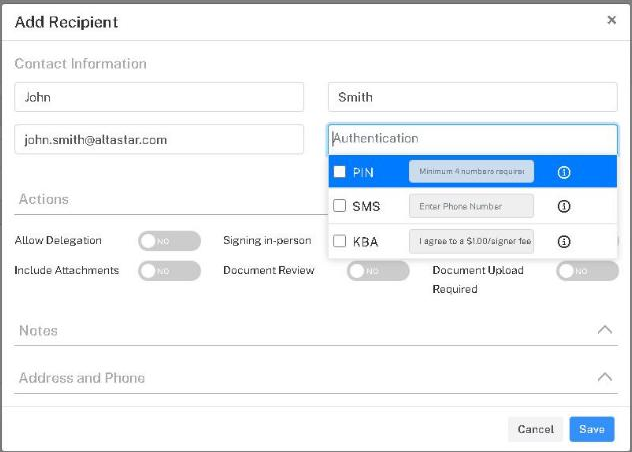
When you add a signer, click the Authentication box in the Add Recipient dialog and tick PIN, SMS or KBA. PIN asks for the digits, SMS for the signer's mobile number, and KBA for your agreement to the fee. See Configuring E-sign Sessions.
For a signer already listed, click the three dots at the end of the signer's row under Recipients, choose Edit, and set the security option there.